How to Set Up a Video Wall for Your Business or Event?
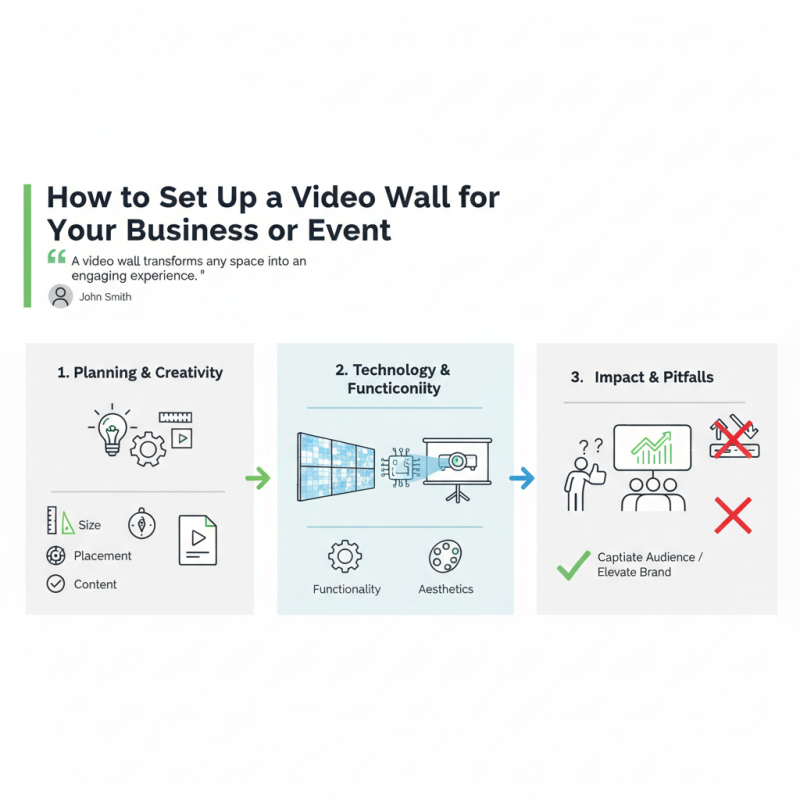
In today's visual landscape, a "video wall" offers impressive opportunities for businesses and events. John Smith, a leading expert in digital displays, once said, "A video wall transforms any space into an engaging experience." This highlights the power and appeal of integrating video walls into various settings.
Setting up a video wall is both exciting and daunting. It demands careful planning and creativity. The right configuration can captivate an audience, but missteps can lead to disappointing results. You have to consider factors like size, placement, and content. The right choice can elevate your brand image. But poor execution might leave attendees confused and uninterested.
Choosing the right technology is crucial. Various options exist, from LED panels to projection systems. Each has advantages and drawbacks. An effective video wall requires commitment and insight. It's not just about aesthetics; functionality matters too. Reflecting on these elements can lead to an impactful setup and avoid common pitfalls.
What is a Video Wall and Its Applications in Business Events?
A video wall is a display made up of multiple screens. It shows dynamic content, making it impactful for audiences. Businesses use video walls for various events, from product launches to conferences. They create an immersive environment that captures attention effectively.
In a business setting, a video wall can enhance presentations. It allows for showcasing videos, images, and data simultaneously. This creates a powerful visual experience. However, planning is crucial. Placement and spacing can affect the overall impact. If screens are too far apart, the message can become diluted. Visibility from different angles should be considered.
Video walls can also serve as digital signage. They can display real-time data, news, or social media feeds. This continuous flow of information keeps guests engaged. But, content quality is essential. Poor visuals may lead to audience disinterest. It’s vital to evaluate your message and design consistently. A video wall can be a fantastic tool, but it needs careful thought to achieve its full potential.
How to Set Up a Video Wall for Your Business or Event?
What is a Video Wall and Its Applications in Business Events?
| Dimension |
Description |
Application |
| Size |
Typically ranges from 1x2 to 10x10 panels, customizable based on needs. |
Used in conferences, Product launches, Trade shows. |
| Resolution |
Common resolutions include Full HD (1920x1080) and Ultra HD (3840x2160). |
High-quality visuals for presentations and advertisements. |
| Technology |
LCD, LED, and Projection systems. |
Visual displays for retail spaces, event venues. |
| Interactivity |
Touchscreen capabilities available for user engagement. |
Enhancing customer experience in exhibitions and trade fairs. |
| Cost |
Prices range from a few thousand dollars to tens of thousands, depending on setup. |
Budget considerations for planning events. |
Factors to Consider When Planning a Video Wall Installation
When planning a video wall installation, several key factors come into play. Understand the space where the video wall will go. Measure the dimensions carefully. Think about lighting too; too much glare can ruin the experience. You want people to enjoy what they see.
Tips: Choose a location with minimal obstruction. The view should be clear from as many angles as possible. Wall support is crucial; make sure it can handle the weight of the panels. This is often overlooked and can lead to issues.
Next, consider the content that will be displayed. Is it promotional material, live feeds, or movies? The type of content influences the technical requirements. High-resolution displays work best for detailed graphics. However, they can be costly. Reflect on budget constraints and available resources.
Tips: Always test your content before the event. Check for playback issues and ensure that transitions are smooth. If you’re using multiple screens, align settings for seamless visuals. Avoid mismatched colors, which can distract viewers.
Step-by-Step Guide to Selecting Video Wall Components
Setting up a video wall for your business or event requires careful selection of components. Start with the displays. Choose the right size and resolution for your space. A study from the International Display Consortium shows that 85% of viewers retain messages from visually engaging displays. Consider LED panels for brightness and clarity, especially in well-lit environments. Make sure they match your content and ambient light.
Next, focus on the processing components. Video wall processors are crucial. They manage input sources and control display layouts. Research indicates that 40% of installations struggle with compatibility. Ensure the processor supports your chosen display technology. This will save time and costs down the line.
Tips: Validate your cable management. Poor connections might lead to disruptions. Additionally, think about the mounting structure. It should be sturdy yet flexible for future changes. Also, assess your workspace. Improper arrangements can compromise viewer engagement. Reflection on these aspects can streamline the installation process.
Best Practices for Arranging a Video Wall for Maximum Impact
Creating an impactful video wall begins with careful planning. Choose the right location that has enough foot traffic. The wall should captivate attention without overwhelming the surrounding space. Consider using a clean backdrop. This enhances the video itself. If the environment is cluttered, the impact may fade.
Next, focus on content. The visuals should align with your brand’s message. Utilize high-quality images and videos to engage viewers. Mixing dynamic content with static images can sustain interest. Test your visuals for clarity. Sometimes, what looks good on a screen may not translate well in a large format. It might be wise to gather feedback from a trial audience.
Lastly, lighting plays a crucial role. Control ambient light to avoid glare. If reflections interfere, the message can get lost. Think about how viewers will experience the wall from different angles. Some people may need to move around, while others might stand still. Be prepared to adjust your setup based on these observations. Reflect on what works and what doesn’t. Adaptability can lead to a more powerful viewing experience.
Video Wall Impact Analysis


 House of Worship
 Transportation
 Trade shows led display
 retail
 Creative Led Solutions
 Hospitality
 Higher Education
 Corporate LED